Sound familiar?
Your files are everywhere, except where you need them
Images, manuals, datasheets and product files. Every team keeps them somewhere else:
on shared drives, in mailboxes and with the agencies you work with;
in several versions, so the wrong one ends up on the site or with a customer;
customers and partners ask for files by mail, and someone has to look for them;
nobody knows exactly who may see or use what.
The more products, languages and channels you have, the more time that costs.
The platform
What is Sitecore Content Hub?
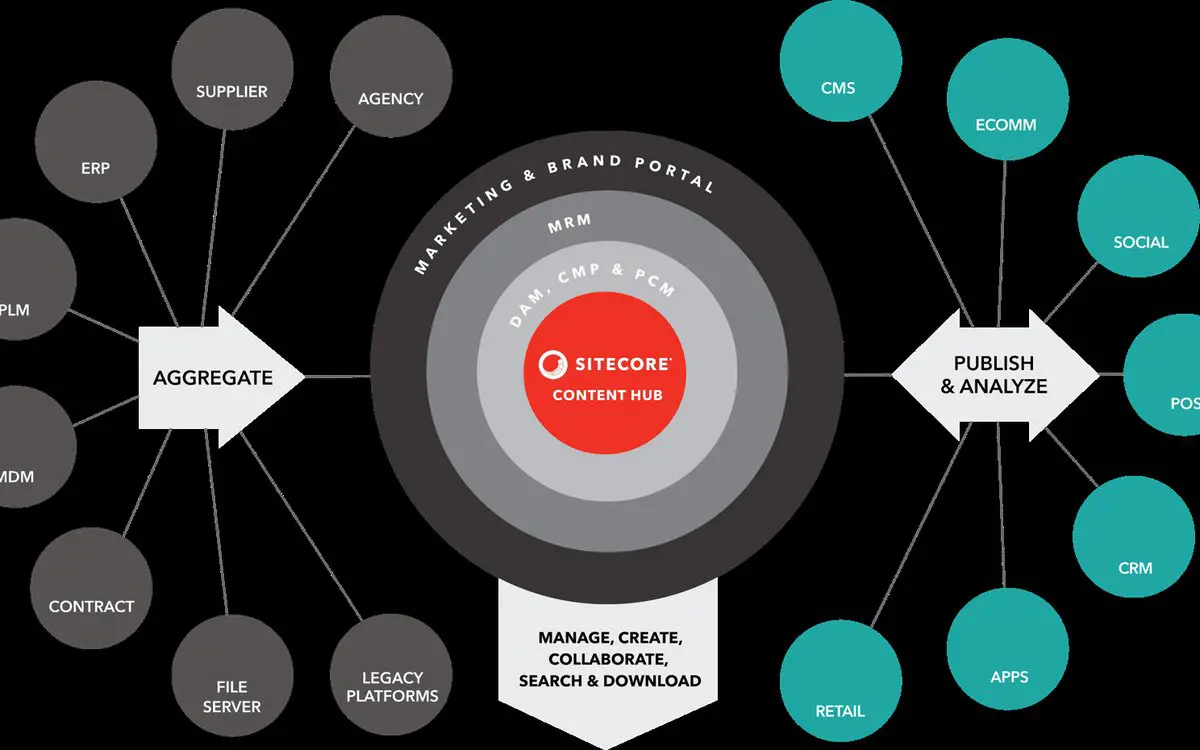
Content Hub is Sitecore's platform for digital asset management (DAM) and content operations. All your assets live in one place, with metadata, versions and rights, and every channel gets them from there: your website, a portal, your marketing tools.
Sitecore now sells the DAM part as SitecoreAI DAM, the asset management within SitecoreAI. Content Hub itself continues: existing customers keep their assets and workflows, and Sitecore keeps developing it. Content Hub works with Sitecore XP and with SitecoreAI.
What you get
One source of truth for every channel
One place for all your files, with the latest approved version always on top.
Rights per user and per section: people upload and edit only where they're allowed to.
Found in seconds, thanks to a data model and taxonomy built around your products.
The right version everywhere: change a file once and your site and portal show the new one.
What we do
What we do for Content Hub
Analysis and choice. We map your assets, users and systems, and check that Content Hub is the right fit.
Set-up: data model, taxonomy, metadata, rights and approval flows.
Integration with your Sitecore site and other systems, through GraphQL, the REST API and Sitecore's SDKs.
Customer or partner portal, with single sign-on: every user sees only the files they have access to.
Your own screens inside Content Hub, built in React, when the standard ones don't fit how your team works.
Asset migration from drives or an old DAM, with the metadata cleaned up.
Quality assurance. Our QA team tests the portal, the rights and the integrations against test cases.
Why GraphQL?
“Our custom schema items and taxonomies, with their relations, took too much time to retrieve for a website. So for everything except specific asset data, we switched to GraphQL. That gave us a big gain in performance.”
 Danny Paul van Iersel
CTO, Blastic
How it works
How a Content Hub project works
Intake and analysis. Which assets do you have, who uses them, where do they need to go, and which systems are involved?
Data model and rights. We design the structure, the taxonomy and who may do what, together with the people who will use it.
Build, migrate and connect, tested by our QA team. We set up Content Hub, move your assets and build the integrations and the portal.
Go live. We walk your team through the new way of working, so they can manage the assets themselves.
At a glance
Platform: Sitecore Content Hub, now also SitecoreAI DAM
Works with: Sitecore XP and SitecoreAI
Case: the Melexis customer portal
First step: an intake
Intake
Tell us which assets you have and where they need to go. We'll tell you honestly whether Content Hub fits, and what it takes.
Trust
Content Hub in practice
Our CTO, Danny Paul van Iersel, leads our Content Hub work. For Melexis, we chose Content Hub together, set it up and built a customer portal on it that is connected to their Sitecore site.
Melexis
Digital asset management and a customer portal with single sign-on: customers find manuals, documentation and software updates for their products.
How we connected the portal
Danny explains how the portal gets its assets from Content Hub DAM, and why we switched to GraphQL for speed.
Hosting & support
After go-live
Sitecore runs and updates Content Hub as a cloud service. What you build on it, such as integrations, a portal and your own screens, has to keep up. With a support agreement, we take that on:
we follow Sitecore's release notes and check your integrations and components against every update;
new connections, sections and users when your organisation grows;
support from people who know your set-up.
Price
What does a Content Hub implementation cost?
It depends on the number of assets and users, how complex your rights are, the integrations you need and whether a portal is part of it. That's why it starts with an intake. You get a first estimate and, after the analysis, a quote that fits your situation.
You buy your Content Hub licence directly from Sitecore.
Frequently asked questions
What is the difference between a DAM and a CMS?
A CMS manages the pages of your website. A DAM (digital asset management) manages the files behind them, such as images, videos and documents, with their metadata, versions and rights, for every channel at once. Your CMS then gets its files from the DAM.
What are PCM and CMP in Content Hub?
PCM (product content management) holds your product information, such as descriptions and specifications, and links it to the right assets. CMP (content marketing platform) is for planning, writing and approving content such as articles and campaigns. Both are part of Content Hub, next to DAM.
What is the difference between Content Hub and Content Hub ONE?
Content Hub ONE is a separate product: a lightweight headless CMS for structured content, delivered through an API. Content Hub is the broader platform for assets, product content and content operations.
Which APIs does Content Hub have?
Content Hub has a GraphQL API in two forms: Preview, which returns all content, and Delivery, which returns only approved and published content. There is also a REST API, and SDKs for .NET (the Web Client SDK) and JavaScript.
What is a rendition?
A rendition is a version of an asset that Content Hub generates from the original, such as a preview image, a thumbnail or a smaller web format. Your site or portal requests the rendition it needs, so nobody has to resize files by hand.
What is an External Component?
An External Component is your own React app running inside the Content Hub interface. It lets you add screens or actions that Content Hub doesn't have as standard, using the JavaScript SDK to read and change data.
Tell us where your assets are today
We'll look at your files, your users and your systems, and tell you what Content Hub can do for you.