By Marek Musielak, 10-07-2026
What if you could run code as a Sitecore Forms Submit Action without deploying anything to your servers at all? Ad hoc, any code you like. In the Sitecore world, the first thing that springs to mind is probably "PowerShell", and rightly so. The catch is that Sitecore PowerShell Extensions shouldn't be installed on Content Delivery servers. So why not execute it on Content Management instead?
First up is the code for the Sitecore Forms Submit Action itself. It's a simple setup: create a remote event object, pass the FormSubmitContext along with parameters containing the script's ID into that event object, and then queue the event in the current database's EventQueue.
Get in touch
There's often a smarter way to extend Sitecore Forms without extra deployments. Curious what's possible for your solution? We're happy to help.
using System;
using Sitecore;
using Sitecore.Diagnostics;
using Sitecore.ExperienceForms.Models;
using Sitecore.ExperienceForms.Processing;
using Sitecore.ExperienceForms.Processing.Actions;

namespace MyAssembly.MyNamespace
{
    public class ExecuteScriptAction : SubmitActionBase<ExecuteScriptActionParameters>
    {
        public ExecuteScriptAction(ISubmitActionData submitActionData) : base(submitActionData)
        {
        }

        protected override bool Execute(ExecuteScriptActionParameters parameters, FormSubmitContext formSubmitContext)
        {
            try
            {
                var @event = new ExecuteScriptRemoteEvent(Sitecore.Configuration.Settings.InstanceName, "custom:executescriptremote");
                @event.FormSubmitContext = new LimitedFormSubmitContext(formSubmitContext);
                @event.Data = parameters;
                (Context.ContentDatabase ?? Context.Database).RemoteEvents.EventQueue.QueueEvent(@event);
            }
            catch (Exception exc)
            {
                Log.Error("Exception in ExecuteScriptAction", exc, this);
                return false;
            }

            return true;
        }
    }
}
The code for ExecuteScriptRemoteEvent, LimitedFormSubmitContext, and ExecuteScriptActionParameters is straightforward. What matters most is how we serialise them using Newtonsoft.Json and TypeNameHandling.All. This is essential to ensure that field view model objects can be deserialised back into the correct classes.
using System;
using System.Collections.Generic;
using System.Linq;
using Sitecore.ExperienceForms.Models;
using Sitecore.ExperienceForms.Processing;

namespace MyAssembly.MyNamespace
{
    public class LimitedFormSubmitContext
    {
        public LimitedFormSubmitContext()
        {
        }

        public LimitedFormSubmitContext(FormSubmitContext context)
        {
            FormId = context.FormId;
            PageId = context.PageId;
            Fields = context.Fields;
            Errors = context.Errors;
            Canceled = context.Canceled;
        }

        public Guid FormId { get; set; }

        public Guid PageId { get; set; }

        public IList<IViewModel> Fields { get; set; } = new List<IViewModel>();

        public IList<FormActionError> Errors { get; set; } = new List<FormActionError>();

        public bool HasErrors => Errors.Any();

        public bool Canceled { get; set; }
    }
}
using System;

namespace MyAssembly.MyNamespace
{
    public class ExecuteScriptActionParameters
    {
        public Guid ReferenceId { get; set; }
    }
}
using Newtonsoft.Json;
using Sitecore.Eventing;
using System.Runtime.Serialization;
namespace MyAssembly.MyNamespace
{
[DataContract]
internal class ExecuteScriptRemoteEvent : IHasEventName
{
private static JsonSerializerSettings _settings;
private static JsonSerializerSettings Settings => _settings
?? (_settings = new JsonSerializerSettings
{
TypeNameHandling = TypeNameHandling.All
});
public ExecuteScriptRemoteEvent(string instanceName, string eventName)
{
InstanceName = instanceName;
EventName = eventName;
}
[DataMember]
public string InstanceName { get; protected set; }
[DataMember]
public string EventName { get; protected set; }
[IgnoreDataMember]
public LimitedFormSubmitContext FormSubmitContext { get; set; }
[IgnoreDataMember]
public ExecuteScriptActionParameters Data { get; set; }
[DataMember]
public string FormSubmitContextJson
{
get => FormSubmitContext == null ? null : JsonConvert.SerializeObject(FormSubmitContext, Settings);
set
{
if (!string.IsNullOrEmpty(value))
{
FormSubmitContext = JsonConvert.DeserializeObject<LimitedFormSubmitContext>(value, Settings);
}
}
}
[DataMember]
public string DataJson
{
get => Data == null ? null : JsonConvert.SerializeObject(Data, Settings);
set
{
if (!string.IsNullOrEmpty(value))
{
Data = JsonConvert.DeserializeObject<ExecuteScriptActionParameters>(value, Settings);
}
}
}
}
}
The last piece of code is a Sitecore <initialize> pipeline processor that subscribes to the ExecuteScriptRemoteEvent, retrieves the script item from the Sitecore "master" database, and executes it:
using Sitecore.Data;
using Sitecore.Eventing;
using Sitecore.Pipelines;
using Spe.Core.Host;
using Spe.Core.Settings;
using Sitecore.Data.Items;

namespace MyAssembly.MyNamespace
{
    public class SubscribeToExecuteScriptRemoteEvent
    {
        public void Initialize(PipelineArgs args)
        {
            EventManager.Subscribe<ExecuteScriptRemoteEvent>(OnRemoteEvent);
        }

        private static void OnRemoteEvent<TEvent>(TEvent tEvent) where TEvent : IHasEventName
        {
            var @event = tEvent as ExecuteScriptRemoteEvent;
            if (@event == null)
                return;

            Item scriptItem = Database.GetDatabase("master").GetItem(ID.Parse(@event.Data.ReferenceId));

            if (scriptItem == null) return;

            using (var session = ScriptSessionManager.NewSession(ApplicationNames.Default, true))
            {
                session.SetVariable("formSubmitContext", @event.FormSubmitContext);
                session.ExecuteScriptPart(scriptItem, false);
            }
        }
    }
}
When all the code is in place, the last step is to register the SubscribeToExecuteScriptRemoteEvent processor in a Sitecore config patch file:
<configuration xmlns:role="http://www.sitecore.net/xmlconfig/role/">
  <sitecore role:require="ContentManagement">
    <pipelines>
      <initialize>
        <processor
          type="MyAssembly.MyNamespace.SubscribeToExecuteScriptRemoteEvent, MyAssembly"
          method="Initialize" />
      </initialize>
    </pipelines>
  </sitecore>
</configuration>
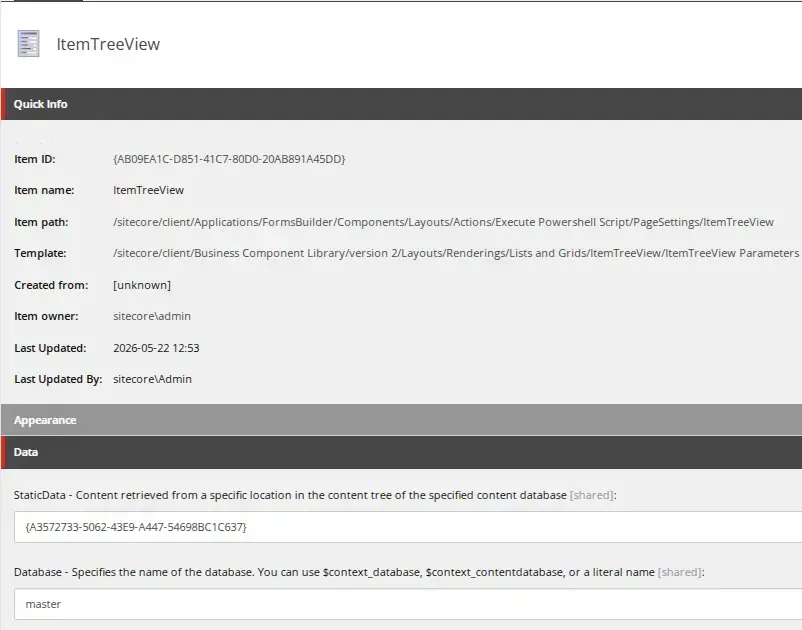
Now it's time to configure things in Sitecore. Log in to the Sitecore core database and duplicate the /sitecore/client/Applications/FormsBuilder/Components/Layouts/Actions/RedirectToPage item along with its subitems, naming the new item Execute PowerShell Script. Update the text on the new item and its subitems accordingly. On the /sitecore/client/Applications/FormsBuilder/Components/Layouts/Actions/Execute PowerShell Script/PageSettings/ItemTreeView item, set the Database field to master and the raw value of the Static Data field to {A3572733-5062-43E9-A447-54698BC1C637}, which limits item selection to the /sitecore/system/Modules/PowerShell/Script Library part of the tree:
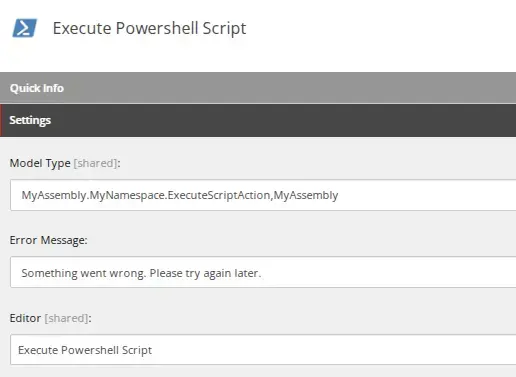
Now switch back to the Sitecore master database and create a new Submit Action item at /sitecore/system/Settings/Forms/Submit Actions/Execute PowerShell Script. Fill in the class details and select the editor you created in the core database.
Create a new PowerShell Script item under /sitecore/system/Modules/PowerShell/Script Library and add its code. You can use $formSubmitContext to access the user's form input, e.g.:
Write-Log ($formSubmitContext | ConvertTo-Json )And there you have it, the new action is now ready to use on any form. Simply add it to the form and select the desired script in the action editor.
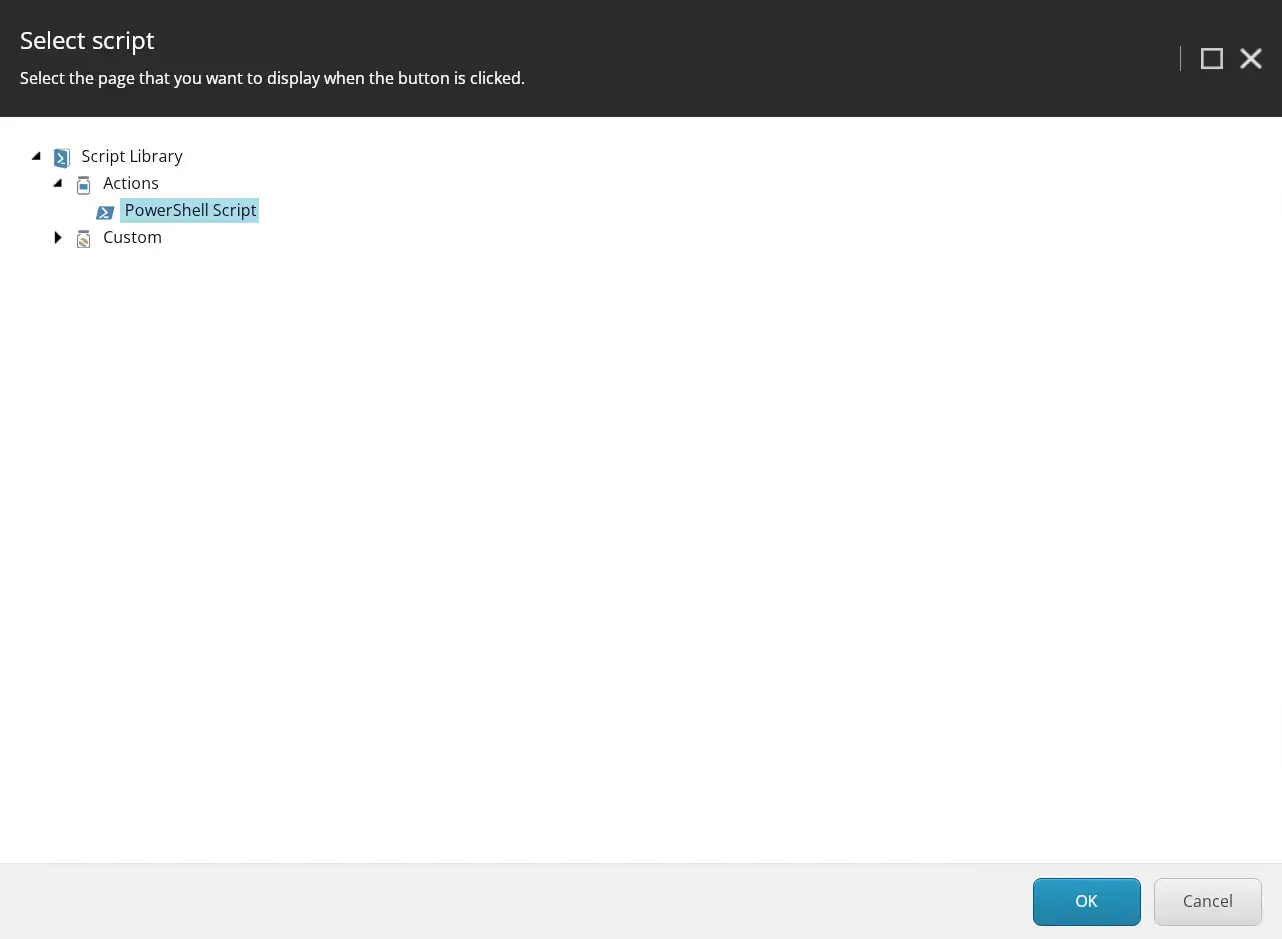
That's all it takes, a custom Submit Action, a remote event, and a PowerShell script item. No deployment needed each time you want to tweak the logic.
Let's talk Sitecore Forms
Get expert advice on extending and optimising your Sitecore solution
Whether it's custom submit actions, remote scripting, or a broader look at your Forms setup, our team can help you get more out of Sitecore without unnecessary overhead. Fill in the form and we'll get back to you.