By Marek Musielak, 09-07-2026
A while back, I published a post covering how to secure the Sitecore Media Library using ClamAV antivirus. That approach works well, but it only covers content authors uploading files through the Sitecore Media Library. Sitecore Forms is a different story: file uploads there are open to anyone, which means an unauthenticated visitor could attempt to drop a malicious file straight into your environment. In this article, we'll walk through the steps needed to validate and scan files submitted via Sitecore Forms before they ever reach storage.
Note: ClamAV installation, configuration, and the IAntivirusService implementation are covered in detail in Protect Sitecore Media Library with ClamAV antivirus.
Assuming ClamAV is already installed and IAntivirusService is registered in your solution, the next step is building a Sitecore Forms validator that stops malicious files from being saved to the database or processed any further. Let's start by creating a class:
Get in touch
Not sure your Sitecore solution is secure? If you want a second pair of eyes on your setup, we're happy to help.
public class AntivirusValidator : ValidationElement<string>
{
    private IAntivirusService _antivirusService;

    protected virtual IAntivirusService AntivirusService => _antivirusService
        ?? (_antivirusService = ServiceLocator.ServiceProvider.GetService<IAntivirusService>());

    public AntivirusValidator(ValidationDataModel validationItem) : base(validationItem)
    {
    }

    public override IEnumerable<ModelClientValidationRule> ClientValidationRules => new List<ModelClientValidationRule>();

    public override ValidationResult Validate(object value)
    {
        if (!(value is List<HttpPostedFileBase> httpPostedFileBaseList) || !httpPostedFileBaseList.Any())
            return ValidationResult.Success;

        foreach (var postedFile in httpPostedFileBaseList)
        {
            if (!AntivirusService.IsFileSafe(postedFile.InputStream, postedFile.FileName))
            {
                return new ValidationResult(FormatMessage(postedFile.FileName));
            }
        }

        return ValidationResult.Success;
    }
}
This class loops through every file submitted to a Sitecore Forms field and flags an error if any of them turns out to be unsafe.
Next, create a validator item under /sitecore/system/Settings/Forms/Validations/Antivirus Validator using:
Type: MyAssembly.MyNamespace.AntivirusValidator, MyAssembly
Message: We cannot process the file '{0}'. Please try again or use a different file.
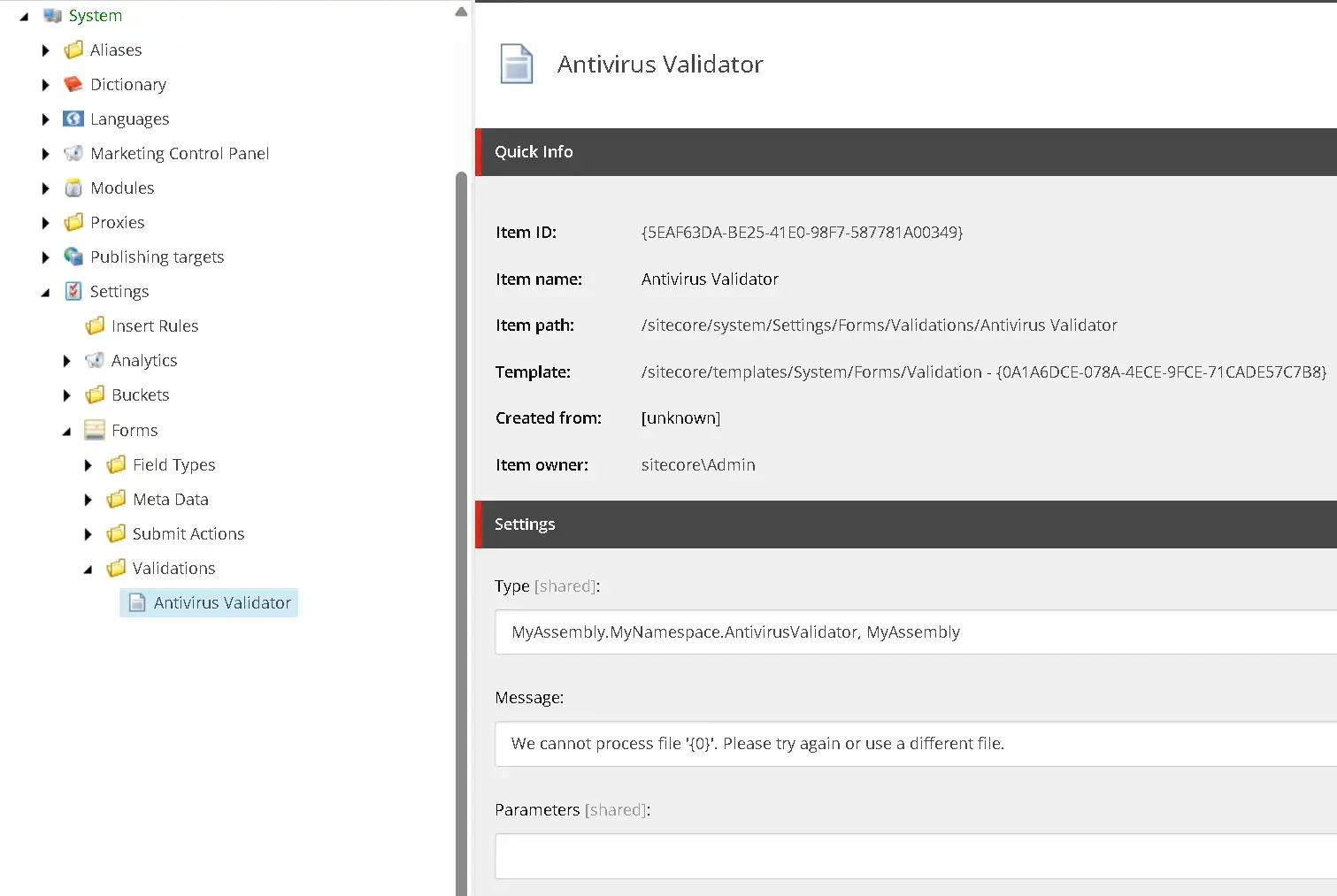
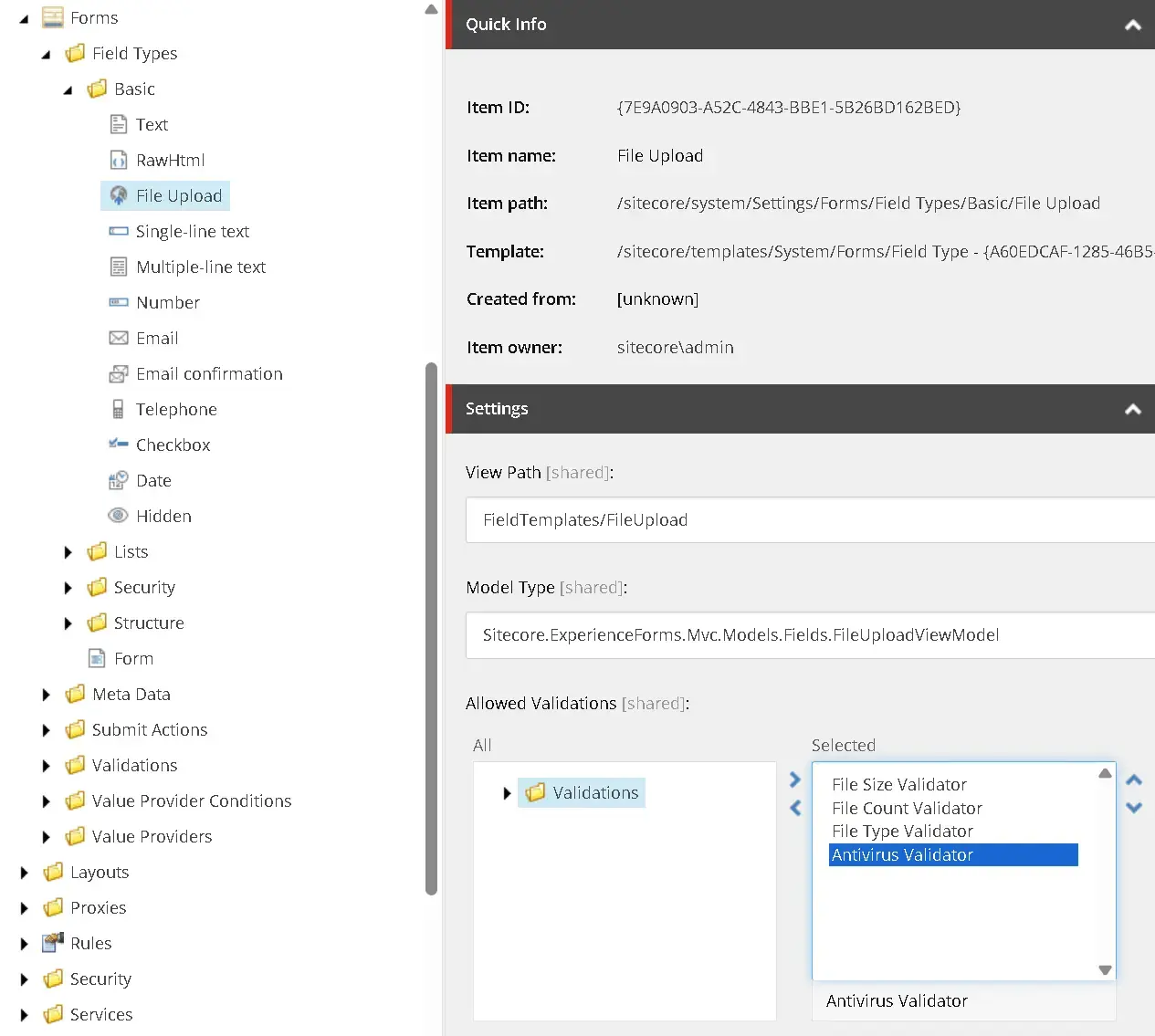
Next, select your new validator in the Allowed Validations field of the /sitecore/system/Settings/Forms/Field Types/Basic/File Upload item:
Finally, if you want the validation applied automatically to every Sitecore Forms File Upload field, select that validator on the standard values item /sitecore/templates/System/Forms/Fields/File Upload/__Standard Values:
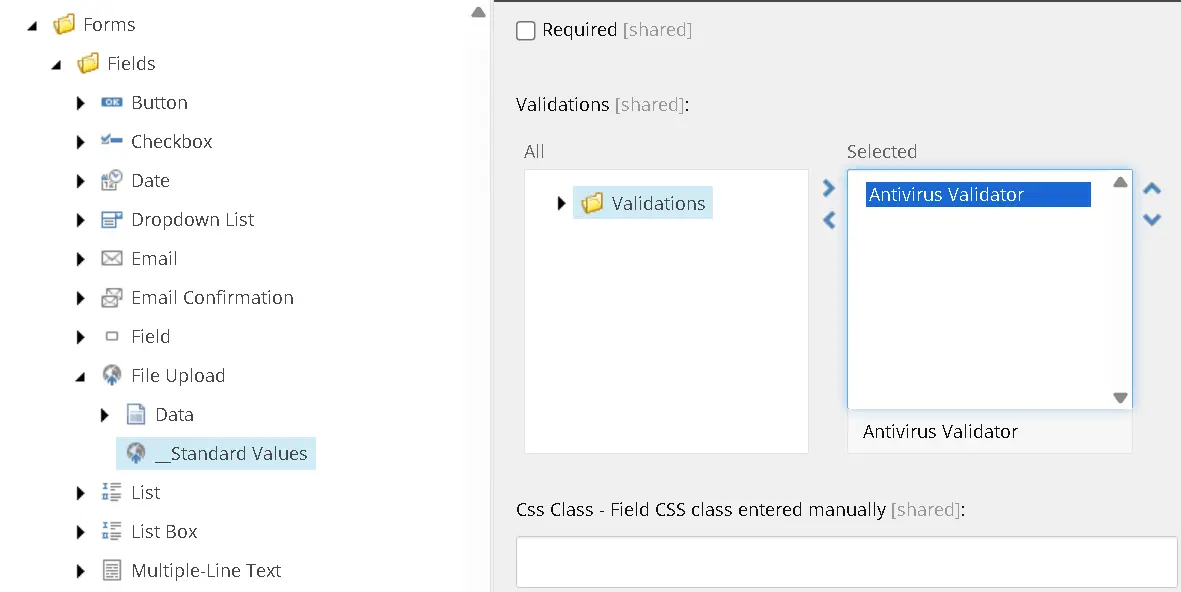
And that's it. From now on, every file submitted through a Sitecore Form will be scanned by the antivirus service, keeping harmful files out of your system.

Let's talk security
Get expert advice on protecting your Sitecore solution
Whether it's antivirus validation, access control, or a broader security review, our team can help you close the gaps before they become a problem. Fill in the form and we'll get back to you.