By Marek Musielak, 10-07-2026
Recently, I ran into a situation where a Sitecore Forms submit action needed to be triggered on the Sitecore Content Delivery server, but actually executed on the Sitecore Content Management server. In my case, the reason was network restrictions; the Content Delivery servers simply couldn't reach a required service directly. To solve this, I made use of Sitecore's Remote Event functionality. If you're facing something similar: your action needs access to the master database, relies on network connectivity that's unavailable from CD, or is CPU-heavy and you'd rather keep that load off the CD servers; here's how to set it up.
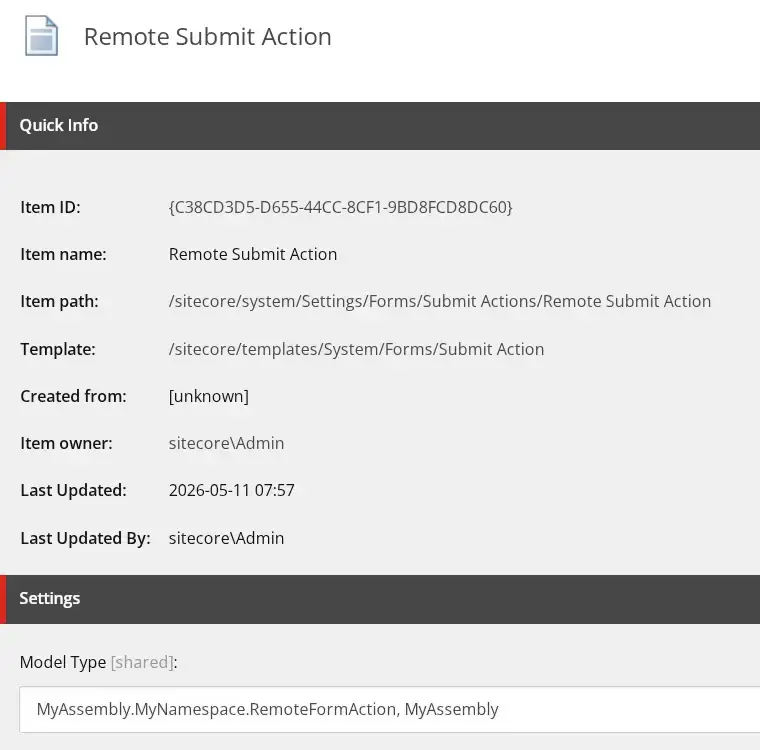
The first step is to create a custom Sitecore Forms submit action class. The logic here is straightforward: we create an instance of the RemoteFormActionEvent class and add it to the context database's EventQueue:
Get in touch
Whether it's offloading workload from Content Delivery, solving network constraints, or improving overall performance, our team can help you find the right approach. Fill in the form and we'll get back to you.
using Newtonsoft.Json;
using Sitecore;
using Sitecore.ExperienceForms.Models;
using Sitecore.ExperienceForms.Processing;
using Sitecore.ExperienceForms.Processing.Actions;

namespace MyAssembly.MyNamespace
{
    public class RemoteFormAction : SubmitActionBase<object>
    {
        public RemoteFormAction(ISubmitActionData submitActionData) : base(submitActionData)
        {
        }

        protected override bool Execute(object data, FormSubmitContext formSubmitContext)
        {
            var remoteEvent = new RemoteFormActionEvent(Sitecore.Configuration.Settings.InstanceName, "form:remoteaction")
            {
                FormSubmitContext = new LimitedFormSubmitContext(formSubmitContext),
                Data = data
            };

            Context.Database.RemoteEvents.EventQueue.QueueEvent(remoteEvent);

            return true;
        }

        protected override bool TryParse(string value, out object target)
        {
            target = JsonConvert.DeserializeObject(value);
            return true;
        }
    }
}
We can't easily serialise and deserialise objects of the Sitecore.ExperienceForms.Processing.FormSubmitContext class, so instead we use a custom LimitedFormSubmitContext class:
Next, select your new validator in the Allowed Validations field of the /sitecore/system/Settings/Forms/Field Types/Basic/File Upload item:
using System;
using System.Collections.Generic;
using System.Linq;
using Sitecore.ExperienceForms.Models;
using Sitecore.ExperienceForms.Processing;

namespace MyAssembly.MyNamespace
{
    public class LimitedFormSubmitContext
    {
        public LimitedFormSubmitContext()
        {
        }

        public LimitedFormSubmitContext(FormSubmitContext context)
        {
            FormId = context.FormId;
            PageId = context.PageId;
            Fields = context.Fields;
            Errors = context.Errors;
            Canceled = context.Canceled;
        }

        public Guid FormId { get; set; }

        public Guid PageId { get; set; }

        public IList<IViewModel> Fields { get; set; } = new List<IViewModel>();

        public IList<FormActionError> Errors { get; set; } = new List<FormActionError>();

        public bool HasErrors => Errors.Any();

        public bool Canceled { get; set; }
    }
}
Our RemoteFormActionEvent, which implements the IHasEventName interface, includes additional properties for the FormSubmitContext and Data objects. Both are serialised using TypeNameHandling.All, which allows them to be correctly deserialised back into their original types; for example, the context's Fields property of type IList<IViewModel>:
using Newtonsoft.Json;
using Sitecore.Eventing;
using System.Runtime.Serialization;

namespace MyAssembly.MyNamespace
{
    [DataContract]
    internal class RemoteFormActionEvent : IHasEventName
    {
        private static JsonSerializerSettings _settings;

        private static JsonSerializerSettings Settings => _settings
            ?? (_settings = new JsonSerializerSettings
            {
                TypeNameHandling = TypeNameHandling.All
            });

        public RemoteFormActionEvent(string instanceName, string eventName)
        {
            InstanceName = instanceName;
            EventName = eventName;
        }

        [DataMember]
        public string InstanceName { get; protected set; }

        [DataMember]
        public string EventName { get; protected set; }

        [IgnoreDataMember]
        public LimitedFormSubmitContext FormSubmitContext { get; set; }

        [IgnoreDataMember]
        public object Data { get; set; }

        [DataMember]
        public string FormSubmitContextJson
        {
            get => FormSubmitContext == null ? null : JsonConvert.SerializeObject(FormSubmitContext, Settings);
            set
            {
                if (!string.IsNullOrEmpty(value))
                {
                    FormSubmitContext = JsonConvert.DeserializeObject<LimitedFormSubmitContext>(value, Settings);
                }
            }
        }

        [DataMember]
        public string DataJson
        {
            get => Data == null ? null : JsonConvert.SerializeObject(Data, Settings);
            set
            {
                if (!string.IsNullOrEmpty(value))
                {
                    Data = JsonConvert.DeserializeObject<object>(value, Settings);
                }
            }
        }
    }
}
Next thing we need is an Initialize pipeline processor that subscribes to our RemoteFormActionEvent:
using Sitecore.Data.Events;
using Sitecore.Eventing;
using Sitecore.Events;
using Sitecore.Pipelines;

namespace MyAssembly.MyNamespace
{
    public class SubscribeToExecuteFormRemoteActionEvent
    {
        public void Initialize(PipelineArgs args)
        {
            EventManager.Subscribe<RemoteFormActionEvent>(OnRemoteEvent);
        }

        private static void OnRemoteEvent<TEvent>(TEvent @event) where TEvent : IHasEventName
        {
            var remoteEventArgs = new RemoteEventArgs<TEvent>(@event);
            Event.RaiseEvent(@event.EventName, remoteEventArgs);
        }
    }
}
The final piece is a RemoteFormActionEventHandler, which handles processing the data on the Sitecore Content Management server. This is where you can do whatever you need with the form data. In my case, I simply log the information to confirm that the correct instance is executing the code and that all the necessary data has been successfully passed on from the Sitecore Content Delivery server:
using System;
using Newtonsoft.Json;
using Sitecore.Data.Events;
using Sitecore.Diagnostics;

namespace MyAssembly.MyNamespace
{
    public class RemoteFormActionEventHandler
    {
        public void HandleRemote(object sender, EventArgs args)
        {
            var eventArgs = args as RemoteEventArgs<RemoteFormActionEvent>;
            if (eventArgs == null)
                return;

            ExecuteAction(eventArgs.Event.Data, eventArgs.Event.FormSubmitContext);
        }

        private void ExecuteAction(object data, LimitedFormSubmitContext formSubmitContext)
        {
            Log.Info($"HandleRemote called on '{Sitecore.Configuration.Settings.InstanceName}'" +
                     $" with data '{JsonConvert.SerializeObject(data)}' " +
                     $"and context '{JsonConvert.SerializeObject(formSubmitContext)}'", this);
        }
    }
}
The last part is the configuration. We register an event and processor on Sitecore Content Management server:
<configuration xmlns:role="http://www.sitecore.net/xmlconfig/role/">
  <sitecore role:require="ContentManagement">
      <events>
          <event name="form:remoteaction">
              <handler type="MyAssembly.MyNamespace.RemoteFormActionEventHandler, MyAssembly" method="HandleRemote" />
          </event>
      </events>
      <pipelines>
          <initialize>
              <processor
                  type="MyAssembly.MyNamespace.SubscribeToExecuteFormRemoteActionEvent, MyAssembly" method="Initialize" />
          </initialize>
      </pipelines>
  </sitecore>
</configuration>
This approach makes it possible to run Sitecore Forms submit actions on the Content Management server instead of Content Delivery. It's a handy solution whenever CD servers can't reach the services they need, or when you simply want to keep that workload off the CD instances.

Let's talk Sitecore architecture
Get expert advice on optimising your Sitecore setup
Whether it's offloading workload from Content Delivery, solving network constraints, or improving overall performance, our team can help you find the right approach. Fill in the form and we'll get back to you.