By Tim Vermaelen, 21-04-2026
Have you ever wondered after watching ChatGPT spit out a bunch of nonsense, what can be improved so it doesn’t lack understanding, history, common sense, overall knowledge and things like that? Do you realise ChatGPT hallucinates 15% of the time?
LLMs are powerful, but they break down without the right setup. That’s where “context engineering” comes in. A brand-new term going viral and it’s all about instructing your little friends properly. Credits to Andrej Karpathy for coining the term.
Forget about talking hours on end to your favourite bot(s). Instead, plan ahead, prepare the information, and then tell your favourite bot pets to start working on it.
Context Engineering is 10x better than prompt engineering and 100x better than vibe coding.
Contact us
Ready to get more from AI? Find out how we use context engineering to deliver real results.
What is context engineering?
Filling the right information in the right format so the LLM can understand is the key. You have all the knowledge, now you need to transfer that knowledge into bits and pieces of information so the LLM can understand.
Because your junior bot is smart, a quick learner, and always polite, even if you yell at him, it’s important to instruct properly but more over to feed properly.
It’s broader than prompt engineering. Prompt engineering is about writing good instructions, while context engineering is about everything that gets fed into the model; instructions, background data, retrieved documents, conversation history, role definitions, constraints, etc.
Prompt engineering is how you ask.
Context engineering is what you feed.
Some of the key practices include:
Prompt design & formatting
Using clear role definitions (“You are a legal assistant specialising in contracts…”).
Structuring instructions with delimiters, step-by-step guidance, or templates.
Context management
Deciding which parts of the conversation history to keep vs. summarise.
Injecting metadata (timestamps, user preferences, environment info).
Avoiding “context drift” by pruning or reformatting history.
Retrieval-augmented generation (RAG)
Dynamically pulling in external knowledge (docs, databases, APIs).
Deciding how to chunk and embed information so the model can use it effectively.
Compression & abstraction
Summarising long histories into shorter representations.
Re-encoding raw data into structured formats (JSON, tables, bulleted lists) that the model can digest better.
Context shaping / framing
Adding hidden scaffolding (few-shot examples, reasoning steps, task-specific schemas).
Influencing style, tone, or domain reasoning without overwhelming the user with instructions.
In short: context engineering is about controlling what the model pays attention to and how that information is presented. It’s the bridge between raw data and useful answers.
Context engineering in practice?
Yes, you can find basic templates on Github:
But to be honest, this feels already a bit overwhelming so why don’t I ask my little helper instead?
I need some help with AI/LLM to update the design for a customer website.
I have an xd file/or access to the adobe xd cloud where the design can be found.
I want to use a template structure to instruct Github Copilot and some MCP services.
Can you provide me with such a template structure?
Any basic AI agent can help you write the md files required. It’s up to you to verify the contents of those files and provide additional information wherever you see fit.
Now I must point out that basic AI tools or chat tools don’t have the capability to access your file system directly due to security reasons. So with basic tooling you’ll end up creating files and copy/pasting all related content.
At this point, this is where I left Github Copilot and stumbled upon Claude. Now I already had this in the back of my mind but I was willing to wait until I actually needed it. So I downloaded the Claude Desktop application as suggested by my little friend, because the Claud Desktop does have access to your File system.
If I want Claude Desktop to access the file system, you can do so by configuring the Extensions settings. I installed the Filesystem.
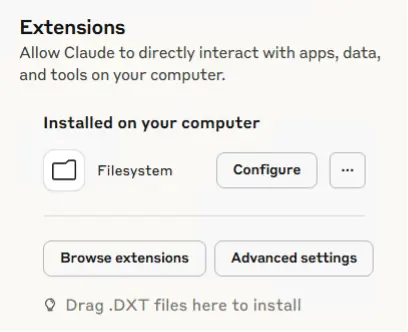
Here you can configure the directories it has access to.
In the Connectors settings you can configure at which point it will ask for permission or you can grant permission directly.
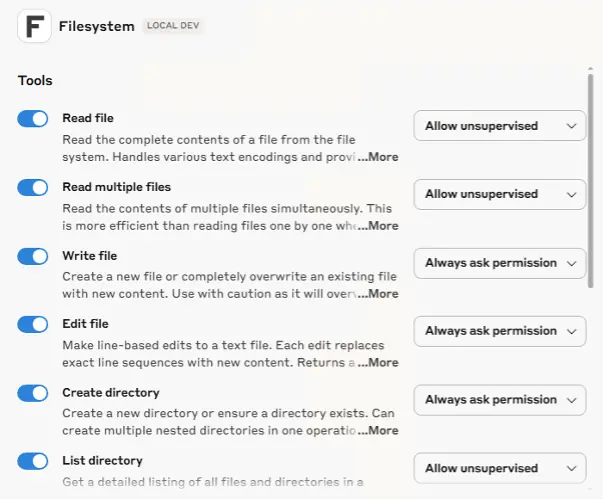
And now let’s ask our new little friend to assist with writing the Context Engineering strategy.
If you have given it the proper access rights and folders, this tool will do magic. It will read and understand your directory structure, enlist all properties, investigate all the information required to complete the structured md files.
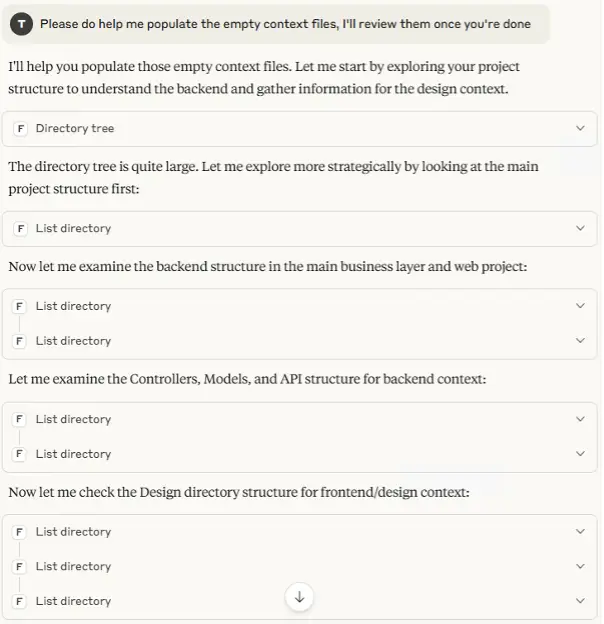
At this point I got too excited and hit the limitation of the Free tier plan.
Next up: Let’s see how much of the tasks we can automate using a Pro tier plan. It’s in my understanding we need access to Claude Code (not the little chat friend) but the actual tool that codes for you. We’ll come back to this later.
Stop endlessly tweaking prompts
Start getting consistent, meaningful output from your AI tools
At Blastic, we help businesses apply context engineering from strategy through to implementation, tailored to your goals and workflow. Get in touch today and let's explore what's possible.